
Inside the Phantom Engine
Trade Like an Institution
AI-powered market intelligence that reads institutional footprints and retail trap zones.
Core Intelligence Systems
Three pillars of institutional-grade market analysis
Volatility-Adaptive Models
Dynamic algorithms that adjust to market conditions in real-time, ensuring precision across all volatility regimes.
Multi-Layer Exponential Frameworks
Sophisticated EMA structures that filter noise and identify true institutional momentum shifts.
Real-Time Breakout Validation Engine
Instant verification of breakout authenticity, separating genuine moves from false signals.

The Confidence Meter
Every signal comes with a 0-100% confidence score, helping you prioritize high-probability setups
High Probability
Strong institutional alignment with clear momentum
Moderate
Decent setup but requires careful monitoring
Avoid
Weak signal, high risk of false breakout
How to Use Confidence Scores
Focus on signals above 70% for high-probability trades. Scores between 50-70% require additional confirmation. Below 50% should generally be avoided unless combined with strong price action.
How Confidence is Calculated
Three critical factors combine to generate your confidence score
Candle Strength vs Volatility
Measures the power of price movement relative to current market volatility (ATR)
Distance from VWAP
Evaluates how far price has deviated from institutional volume-weighted average
Momentum Flow at Breakout
Analyzes the acceleration and volume surge during breakout confirmation

The Algorithm
PhantomCat combines these three factors using proprietary weighting to generate a single confidence score. Higher alignment across all three factors results in higher confidence — giving you clarity on which setups deserve your capital.
Entry & Execution Logic
Simple, precise rules for entering trades with institutional timing
BUY Setup
PhantomCat identifies a BUY signal with confidence score
Wait for next candle to break above previous high
Enter long with SL below signal candle low
Target shown as TP line on chart
SELL Setup
PhantomCat identifies a SELL signal with confidence score
Wait for next candle to break below previous low
Enter short with SL above signal candle high
Target shown as TP line on chart

Key Execution Principles
- Always wait for breakout confirmation before entry
- Use the provided SL and TP levels for risk management
- Higher confidence scores deserve larger position sizes
On-Chart Features
Everything you need, displayed clearly on your TradingView chart
BUY/SELL Labels
Clear signal markers directly on your chart
TP Line (Target)
Automated profit target calculation
SL Line (Stop Loss)
Risk management levels for every trade
Confidence %
Real-time probability score for each signal
Live Chart Examples

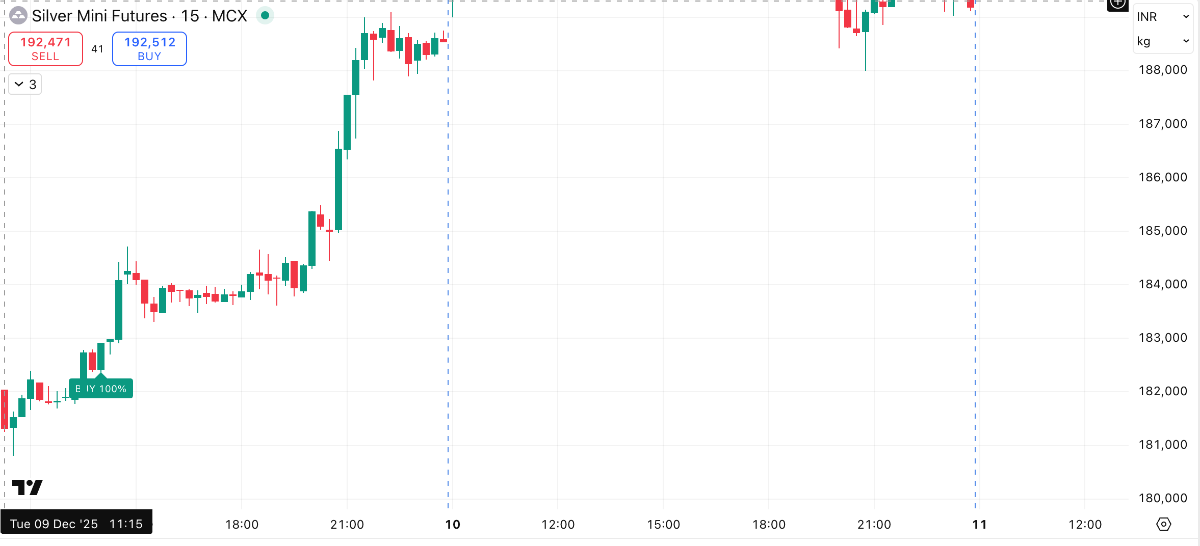
BUY Signal with Confidence
SELL Signal with SL/TP
Multiple Signals Overview
Works Seamlessly with TradingView
PhantomCat integrates directly into your TradingView workspace. All signals, levels, and confidence scores appear automatically on your charts — no manual input required.
Smart Alerts
Never miss a signal. Get instant notifications for every trading opportunity.
BUY
Instant notification when a buy signal appears
SELL
Instant notification when a sell signal appears
TARGET
Alert when price reaches your profit target
STOP LOSS
Alert when stop loss level is triggered

How to Set Up Alerts
Add PhantomCat to Chart
Apply the indicator to your TradingView chart
Right-Click on Indicator
Access the alert creation menu
Select Alert Type
Choose BUY, SELL, TARGET, or STOP LOSS
Configure Notification
Set up email, SMS, or app notifications
Multi-Platform Notifications
Receive alerts via TradingView app, email, SMS, or webhook. Trade from anywhere, anytime — PhantomCat keeps you connected to every opportunity.

From Chaos to Clarity
Phantom exposes institutional zones, filters noise, and aligns traders with real market conviction.
The market is not random. It's a battlefield where institutions move billions while retail traders chase shadows. PhantomCat was built to level the playing field.
By combining volatility-adaptive models, multi-layer exponential frameworks, and real-time breakout validation, PhantomCat reveals what others can't see — the footprints of smart money.
We don't predict. We observe. We don't guess. We calculate. We don't chase. We wait for conviction.
Clarity
Cut through market noise with precision signals
Conviction
Trade only when probability is on your side
Patience
Wait for institutional alignment, not impulse
The best trades whisper. The worst ones scream. PhantomCat listens to the whispers.
Plans & Pricing
Choose the plan that fits your trading journey
1-Month Plan
+ GST
- Full access to Phantom Indicator
- Live buy/sell signals
- Trend zones
- Entry/exit guidance
- Works on TradingView
Contact: admin@quantloop.tech
3-Month Plan
+ GST
- Full access to Phantom Indicator
- Live buy/sell signals
- Trend zones
- Entry/exit guidance
- Works on TradingView
Contact: admin@quantloop.tech
6-Month Plan
+ GST
- Full access to Phantom Indicator
- Live buy/sell signals
- Trend zones
- Entry/exit guidance
- Works on TradingView
Contact: admin@quantloop.tech
Annual Plan
+ GST
Saves ₹3,189 vs monthly
- Full access to Phantom Indicator
- Live buy/sell signals
- Trend zones
- Entry/exit guidance
- Works on TradingView
Contact: admin@quantloop.tech
GST Note (Mandatory Compliance)
All prices above are exclusive of GST. Taxes will be added at checkout as per applicable government regulations.
SEBI & Trading Disclaimer
Risk Warning: Trading in financial markets involves substantial risk and may not be suitable for all investors. Past performance is not indicative of future results. You should carefully consider your financial situation and risk tolerance before trading.
Not Financial Advice: PhantomCat is a technical analysis tool designed to assist traders in identifying potential trading opportunities. It does not constitute financial advice, investment recommendations, or a guarantee of profits. All trading decisions are solely your responsibility.
SEBI Compliance: Quantloop Technologies and PhantomCat are not registered investment advisors with SEBI (Securities and Exchange Board of India) or any other regulatory authority. We do not provide portfolio management services, investment advisory services, or guaranteed returns.
Educational Purpose: This indicator is provided for educational and informational purposes only. Users are advised to conduct their own research, perform due diligence, and consult with qualified financial advisors before making any trading decisions.
No Liability: Quantloop Technologies, its developers, and affiliates shall not be held liable for any losses, damages, or claims arising from the use of PhantomCat. Trading involves risk of loss, and you may lose your entire investment.
Market Conditions: Market conditions can change rapidly. No indicator or system can predict market movements with 100% accuracy. Always use proper risk management, including stop losses and position sizing.
By using PhantomCat, you acknowledge that you have read, understood, and agree to this disclaimer. You accept full responsibility for your trading decisions and outcomes.
Last Updated: January 2025 | For questions regarding compliance, contact: admin@quantloop.tech

Invite-Only Script
PhantomCat is an exclusive, invite-only indicator. Access is granted to serious traders who understand institutional market dynamics.
How to Request Access
Prepare Your Information
Have your TradingView username ready
Include Your TradingView Username
We'll review your request and grant access within 24-48 hours
Receive Confirmation
Once approved, you'll receive instructions to add PhantomCat to your TradingView account
Quick Response
24-48 hour approval time
Verified Access
Secure TradingView integration
Full Support
Setup assistance included